Electronic Signing
The department requires that some of our forms be signed prior to submission. To accommodate this, we facilitate the electronic signing of those forms. Some of the forms that require a signature are, but not limited to:
- Formal Applications and their amendments,
- Permitted Development Applications,
- Chattel House Applications,
- Permission to Kill Tree Applications,
- Building Start (Site Layout Certificate) Request,
- Certificate of Compliance.
Signing a Form
Each form is to be signed at the same stage in the cycle. The signing of a form may be a three or four step process, depending on the type of document to be signed. Most documents are usually a three step process. The four step signing process will be covered in a later section dealing with Amending Submitted Applications.
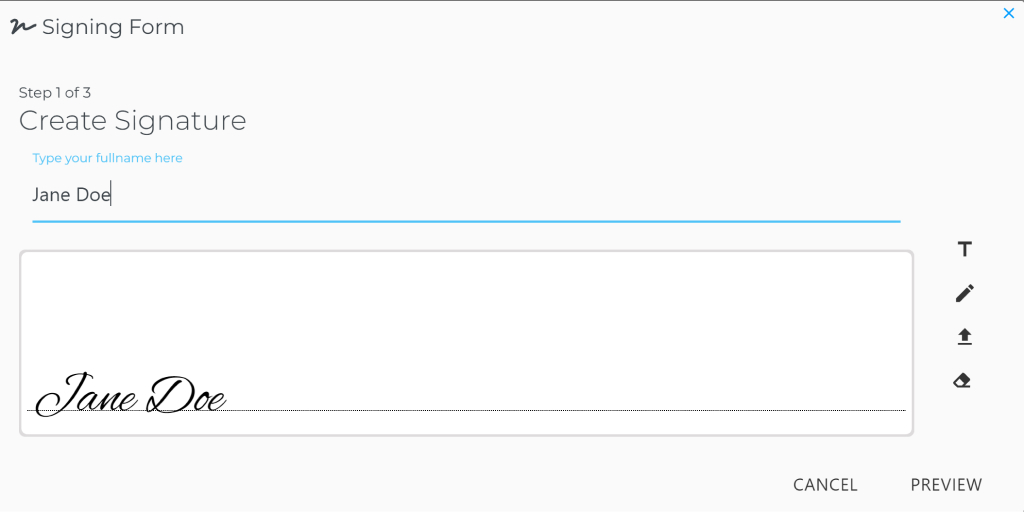
- Step 1: Either the writing, drawing or uploading of your desired signature.
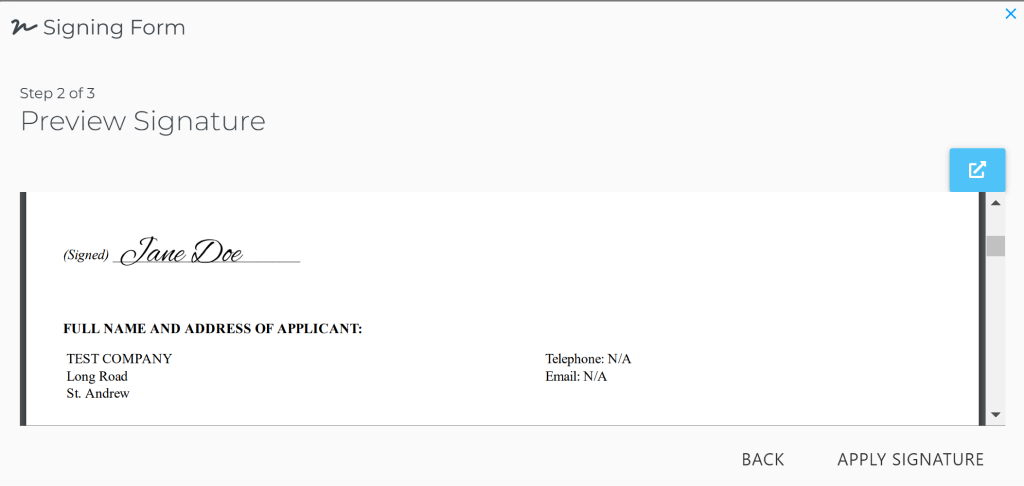
- Step 2: Click the preview button to see how your signature will look and be placed on the document.
- Step 3: Click on the sign button to save the file to the system.
 |
|---|
| Step 1: Creating a Signature |
 |
|---|
| Step 2: Previewing a Signature |
info
Please note signed documents cannot be changed. Each time a new document is signed, any pre-existing document is removed.